
If the 500GB build was disciplined…
and the 1TB build was confident…
Then this one is just over the top stubborn 😉
This is the 160GB “Tiny Build” – a deliberately constrained experiment built around a simple question:
Can you create something GENUINELY FUN on a drive that is objectively TOO small for a proper “Best of Xbox” collection?
On paper, 160GB sounds like a bad idea.
In practice, it turned into something surprisingly entertaining.
Why 160GB?
Basically, I wanted to create an example build for those of you who don’t necessarily have – or want to buy – a common 500GB or 1TB SATA drive, but instead found something smaller lying around.
Because let’s face it: most of us retro gaming fans have old hard disks everywhere, you likely already have one or two:
- Sitting inside an old hard-modded Xbox
- Pulled from a dusty desktop PC
- Stripped out of a dead laptop
- Bought for almost nothing at a flea market
- Or forgotten in a spare parts box
Unlike 500GB and 1TB drives – which are generally considered the most common upgrade targets – disks like the 160GB are often ignored… But what if you’re just tinkering and having a bit of fun?
Should you really ignore a 160GB drive?
They’re “too small” for modern PCs.
Too small for full Xbox sets.
Too small for people chasing completeness.
But what if they are genuinely not too small for fun? That’s what this build explores.
The Concept: Quantity Under Constraint
The larger builds were focused on actually delivering the best of what the Xbox offers across its entire library. The 160GB build can’t realistically do that – so instead, it focuses on clever compromise.
Rather than prioritizing only the biggest heavy hitters, I leaned heavily on the smallest CCI-compressed titles from the previous builds.
Note: All 101 games are still full, complete releases. Nothing is stripped. Nothing is cut. The difference is selection logic.
Using the size sheet from my prior projects, I sorted games not just by quality – but also by footprint. Many of the picks come directly from the 1TB “worthy best-of” list, chosen specifically because they delivered exceptional value per gigabyte… In other words:
The smallest great games.
Compact titles that punch well above their weight.
The biggest bang per byte.
On top of that, I added a handful of absolute must-have OG Xbox essentials – titles that simply can’t be left out of any serious collection, such as Halo: Combat Evolved, Project Gotham Racing 2, and Grand Theft Auto: San Andreas.
And the result?
- 101 original Xbox NTSC titles
- All running on a 160GB SATA drive
- Plus 400+ arcade classics via CoinOPS Lite
So no – this isn’t a strict “best of.” It’s more like: “What happens if we start with the smallest great games… and build upward from there?”
Cerbios & CCI – The Enabler
Just like the larger builds, this project runs on a hard-modded Xbox using Cerbios with full CCI support. Simply put: without CCI (Cerbios Compressed Image), this build would not be viable.

CCI compression dramatically reduces file size while keeping the full game completely intact – no stripped videos, no cut content, no gameplay compromises.
Without Cerbios and CCI support, you would likely be looking at half the number of games in this build – possibly even less. Standard DVD extracts, even for smaller titles, often take up significantly more space and were sometimes padded with empty data to fill the full DVD capacity.
CCI removes that wasted space efficiently. Think of it like a heavily compressed ZIP or RAR file that Cerbios can read on the fly. That capability is exactly what makes a 160GB build like this realistic in the first place.
Is This Really a “Best Of”?
That’s a clear no, and it’s not pretending to be. This is a purpose-built compromise.
Some genres are lighter than they should be. Certain series are incomplete or missing entirely. Sports titles are almost gone. And some obvious heavy hitters simply don’t fit the math.
But here’s the surprise: I genuinely like this build a lot. I even surprised myself: There are 101 good games here. Even with some notable absences, it still feels like a proper Xbox.
Turn it on.
Browse.
Pick something.
Play.
Because the focus leans toward smaller titles, the pacing of the library feels different – tighter, quicker to jump into. There are more “fun, quick” games, and in some ways that’s actually a strength. I can easily picture this build living in:
- A summer house with a small CRT television
- A second, perhaps scratched-up Xbox that’s still technically solid
- A corner of a game room
- A workspace console for short breaks while something renders or installs
- Even a kid’s bedroom
Although in that last case, you really might want to remove titles like Grand Theft Auto and add a few more platformers instead obviously, but you get the idea.
CoinOPS Lite – The Perfect Companion
Since space was tight, I included CoinOPS Lite instead of the larger Ninja Gold or Massive packages that you can find online. Ninja Lite still brings 400+ arcade classics and retro titles, but in a much more compact footprint.
(not my video, but a good overview of the Ninja Lite collection)
You’ll quickly see why I picked this setup. Its small size makes it ideal for our 160GB build, and for convenience, I used an old tool called Xbe Shortcut Maker 2.0 to add a shortcut directly in XBMC4Gamers’ main games and emulator folders. The result gives the setup that “arcade machine in the corner of the room” energy – perfect for a fun quicky.
Why This Build Actually Matters
This post isn’t about squeezing games just for the sake of it. Honestly, it’s more about showing that you don’t need a full set or a huge hard drive to enjoy your original Xbox.
You can take a drive most people would consider e-waste and turn it into something genuinely fun – especially if you already have a 100–300GB drive lying around.
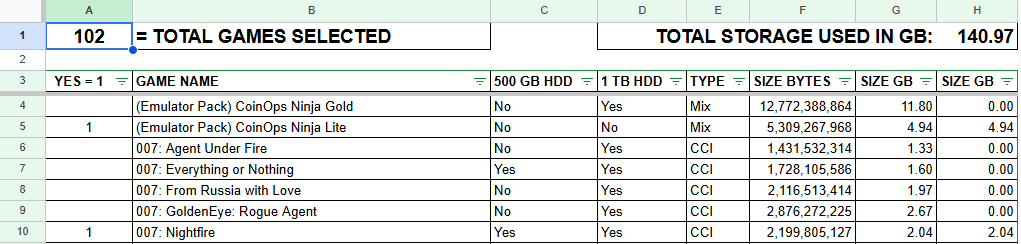
If you want to see exactly how I filled my disk, check out this calculator sheet I made. It lists all the games and their sizes, making it easy to plan your own build. Just mark a game with a “1” to include it, or delete the “1” if you decide to leave it out.
If you want to tinker, just make a copy to your own Google Drive and enjoy: Plan. Swap intelligently. Avoid overflow. Build something that fits your exact capacity. For a kids’ image for example, you can remove a few of the rougher titles and add some platformers instead.
For a 160GB hard drive, aim for roughly ±140GB of total games, since usable space is slightly less than advertised. The same applies to slightly larger drives, leave a bit of overhead. Tinkering with what you have is the point – seeing how much fun you can fit into a tiny package.
Hardware & Software Setup
Just like the other builds, this one is intended for hard-modded Xbox systems (modchip or TSOP) running the latest Cerbios BIOS (v3.1 in my case), which includes full CCI format support.
I formatted the drive using FATXplorer, and I’m using a generic SATA adapter plus an 80-wire IDE cable. You can also use older IDE drives above 80GB, just make sure to use an 80-wire cable – 40-wire IDE won’t work reliably! (See my other posts and videos for a full explanation.)
Nothing exotic is required – just recycle and be practical with the hardware you likely already own.
The Full Game List
You will find the complete list of 101 Xbox titles included in this 160GB build in my calculator sheet.
As always, I do not share game files or download links – that’s a legal grey area. The goal here is to show what’s possible in terms of structure, planning, and presentation, not to distribute the games themselves. You can find the files elsewhere with some effort if you want to.
Personalization Tips
If you want to adapt this build, here are a few practical tips:
- Always check total file size when removing or adding games.
- CCI image sizes vary widely – you can fit +/- ten 200–300MB games instead of one 3GB game.
- Watch your usable partition space and plan accordingly.
- Use my calculator sheet to pre-calculate or double-check changes.
So… Was It Worth It?
While being 100% honest:
Is it the ultimate original Xbox experience?
No.
Is it surprisingly FUN for what it is?
Absolutely!
More importantly: this build proves that smart curation beats raw terabytes. Sometimes, limits make things more interesting – and in this case, it’s a perfect way to recycle e-waste.
Not just old hard drives lying around, but even salvaged Xbox consoles with scratches and knocks. If you are into repairs like I am, this is a way to save every console from being forgotten while still offering a casual, genuinely fun library.
This was a fun challenge, not because it’s perfect, but because it shouldn’t work as well as it does! If you have an old 120GB, 160GB, 200GB, or 250GB drive sitting around, don’t throw it away – there are at least 101 reasons to give it a second life inside an original Xbox.
Thanks for following along, and see you in the next post or video soon!
+++BeepFixer